Key Takeaways
|
Imagine your mobile device as a house.
It is where you live your personal and family life, but also where your daily work happens. Your mobile device contains private photos, apps and messages, corporate pictures, messages and emails, access credentials, internal information and business‑critical systems. It is a mixed environment where personal life and enterprise risk coexist. Securing it goes beyond basic technical controls. It relies on clear structure, ownership, and continuous oversight — an approach we at Techstep consider best practice, aligned with recommendations from Apple, Google, and Samsung.
Now imagine your organisation is responsible for thousands of these houses.
They are spread across time zones, constantly on the move, and inconsistently maintained. Some occupants follow the rules, while others ignore them or quietly bypass them.
The security stakes are incredibly high. Over 60% of global internet traffic flows through mobile devices. According to the Verizon Mobile Security Index, only last year 45% of organisations have suffered a mobile‑related security incident leading to data loss or downtime. Furthermore, the ENISA Threat Landscape 2025 report (European Union Agency for Cybersecurity) identifies mobile platforms as the dominant endpoint attack surface, accounting for 42.4% of observed criminal focus.
The real concern is whether the entire mobile environment is governed, maintained, and controlled well enough to be trusted.
The architectural blueprint of your mobile device
To govern a mobile fleet effectively, you first need to understand the blueprint of the digital home you are protecting: 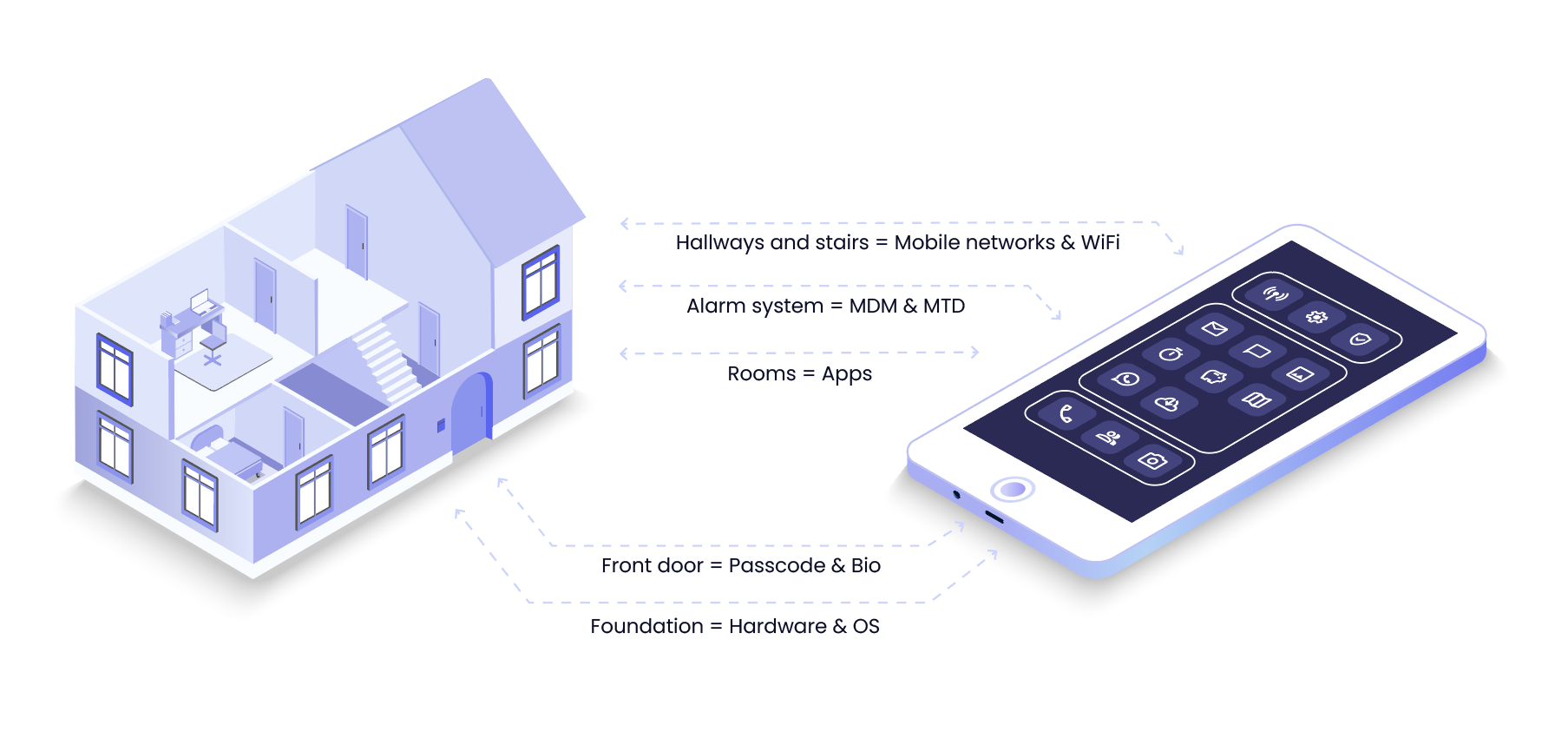
Comparing the house and the mobile device:
- Foundation: Hardware and operating system
- Front door: Passcodes and biometrics
- Rooms: Applications
- Alarm system: Mobile Device Management (MDM) and Mobile Threat Defense (MTD)
- Hallways and staircase: Mobile networks, Wi-Fi, cable connections, other network threats
Each layer of the blueprint plays a role. Mobile endpoint security problems rarely originate from a single missing control; they emerge when these technical layers are inconsistently applied, poorly connected, or not kept up to date.
With this blueprint in mind, building a secure, resilient corporate mobile environment comes down to five critical phases.
1. Establishing the foundation: Who is responsible for the property?
Every secure house starts with a fundamental question: who is responsible for it? If no one takes ownership or sees the need for regular maintenance, it gets neglected. Basic foundations are not upgraded, and necessary repairs are delayed. End users often do not see, care about, or understand the need for OS upgrades and patching.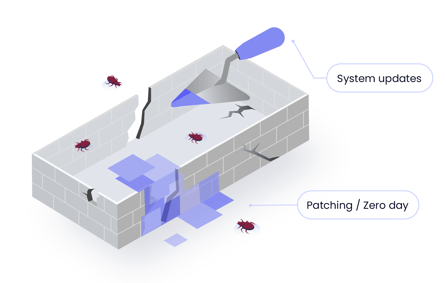
In the mobile world, control often sits with the end user — unless organisations enable the right business capabilities. One of the most important of these is Automatic Device Enrolment (ADE), similar to Microsoft Autopilot, available through Apple Business Manager, Samsung Knox Mobile Enrolment, and Google Zero Touch.
When devices are enrolled this way, IT teams can manage them remotely. They can update operating systems, apply security patches, update apps, and enforce security settings — without relying on users to take action.
Failing to enforce regular OS updates is like letting cracks form in a house’s foundation. If no one takes clear responsibility for mobile security, small issues build up and weaken the entire structure.
For global organisations, public sector bodies, and critical infrastructure providers, OS updates and security patches are the top priority. Apple and Google devices typically require 15–25 updates each year. Skipping these updates increases the risk of data leaks, stolen access, and locked‑out devices— affecting both work and everyday digital life.
Without enforced update routines, it’s like leaving those cracks unchecked — quietly creating entry points that attackers can exploit.
We often see that while organisations have a strict ownership model and policies for laptops, mobile devices fall into a grey area between departments. Defining clear decision rights is the critical first step to securing your foundation.
2. The rules of the front door: Creating an enforceable policy framework
Once the foundation is secure, clear rules of entry must be defined. Every house operates by a set of rules: who gets a key, and which doors stay locked.
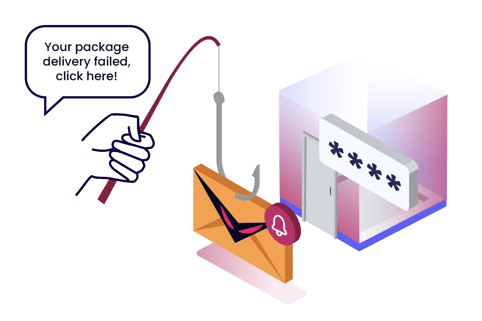
In a mobile environment, the “front door” is made up of passcodes, biometrics, and identity controls that determine who can unlock a device. However, security should not stop at the lock screen. Just as a house has locked rooms inside, mobile devices need protection not only at sign‑in, but also at the application level.
Today, attackers are rarely breaking in. Instead, they are simply logging in. According to the 2025 Zimperium Global Mobile Threat Report, mobile‑specific phishing is growing by 70% year over year. Users are far more likely to click a phishing link sent via SMS, social media, or a QR code than one sent by email. Once an employee enters their login details on a fake page, an attacker has effectively copied the house key — without the user even noticing.
That is why business applications must apply additional app‑level protections, such as multi‑factor authentication or certificate‑based authentication. These controls help protect business data even if user credentials are compromised.
3. Managing rooms, interior doors, hallways and staircases: Access and separation
A locked front door offers little protection if every internal door or window is left wide open. To properly secure a mix of corporate‑owned and personally enabled devices, organisations must understand which apps users are installing and what level of access those apps have to the rest of the “house”.
Without clear internal boundaries, a single compromised app can expose everything inside — personal data, family information, or the wider corporate environment.
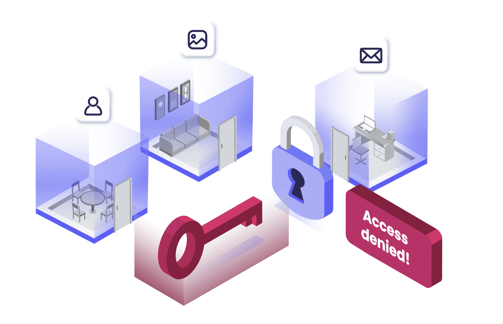
The Rooms
Apps are like the rooms in a house. With modern mobile devices now containing more than 20 different sensors, it is critical for enterprise and public‑sector organisations to prevent sensitive data from leaking to third‑party app vendors. Common risks include:
-
Overreaching permissions: When an app asks for more access than it needs (like your camera or location for a simple text tool), it is the digital equivalent of a handyman asking to enter your bedroom just to change a hallway lightbulb.
-
Sideloading apps: Downloading apps from unknown sources is like allowing a tenant to move in without a background check, introducing unmanaged exposure, and increasing the likelihood of data leakage.
The smart home: AI and sensor access
This app-level risk is now amplified by Artificial Intelligence. AI adds a massive new layer of complexity to these "rooms." Whether built directly into the device's operating system or installed as a separate cloud‑connected app, AI uses text, voice, video, location, and those same 20+ sensors.
On a mobile device, AI is like upgrading to a smart home filled with connected cameras and microphones — inside and outside, in every single room. The critical question for IT leaders becomes: is your data processed locally inside the house, or is it sent partly or entirely to the cloud? And if so, where? Inside Europe, or beyond it?
AI effectively puts app-level threats on steroids. Without strict control, containerisation, and governance over what these "smart" apps can access, enterprise risk escalates quickly.
The hallway and staircase
On a modern phone — just like in a modern house — your personal life and work life live side by side. One room is for family and private moments; another is your home office. You move between them all day without thinking about it.
Problems start when the hallways and staircases are left unprotected. You would never want a stranger standing in your hallway, quietly listening to your conversations. On a mobile device, this happens through man‑in‑the‑middle attacks — often on unsecured or unknown Wi‑Fi networks — or through other network threats that can silently intercept your traffic.
On phones, Wi‑Fi and mobile networks are those hallways. Using an open public network is like letting an intruder stand between your rooms and listen in. For organisations that handle critical infrastructure, and for people who travel globally, it’s also important to detect fake mobile base stations and other network‑level threats as they happen, not after the damage is done.
4. Installing the 24/7 alarm: Continuous threat detection
A house is never completely cut off from the outside world. Most security failures happen because no one spots the warning signs — a window left open, a door that didn’t quite lock, or someone quietly listening in from the hallway.
That’s where Mobile Threat Defence (MTD) comes in. Think of it as a 24/7 alarm system for your mobile devices. It constantly monitors the main sources of mobile risk: phishing attempts, unsafe networks (like malicious Wi‑Fi), risky or infected apps, and weaknesses in the device itself, such as OS or hardware vulnerabilities.
A modern MTD solution works like a smart sensor. When it detects suspicious activity, it acts immediately — working together with Mobile Device Management (MDM) to block the threat before any damage is done. Instead of just sending an alert to IT and waiting for action, MTD integrates directly with MDM to enforce protection automatically. This combined setup runs continuously, protecting both personal and business use of the device, day and night.
Automated device enrolment through platforms like Apple Business Manager, Samsung Knox Mobile Enrolment, and Android Zero‑Touch is now best practice for MDM. But on its own, enrolment is not enough. Adding MTD as an extra security layer is essential to gain the visibility and real‑time insight needed to defend against the full range of mobile threats
5. Maintaining the property over time: Lifecycle and resilience
Houses age, occupants move, and properties are eventually vacated.
The same is true for your mobile device fleet. Security risks peak during these moments of change — when a new device is issued, when an employee changes role, or when hardware is retired. Improper IT asset disposition (ITAD) remains a major cause of data breaches. If the “move‑out” process isn’t handled properly, it’s like leaving the keys behind for anyone to use.
A resilient mobile environment needs a lifecycle approach from day one. That means zero‑touch, secure onboarding, automatic policy changes as roles evolve, and verified data wiping when a device reaches the end of its life.
Handling all of this manually creates risk. When IT teams have to track devices by hand, reconfigure settings, and chase down old hardware, mistakes are inevitable — and data gets exposed. Real resilience comes from automating this kind of “property management”. By standardising zero‑touch provisioning, managed repairs, and certified end‑of‑life data wiping, you remove human error and close the gaps that lead to lifecycle breaches.
Conclusion: Mastering the architecture of mobile security
Employees carry their phones everywhere — into meetings, on public transport, on business trips, and home after work. These devices now hold more sensitive access than most PCs ever did, combining work, communication, finances, health, and private life in one place.
That reality means mobile security cannot depend on a single control. A secure digital house is built through layers working together: clear ownership and accountability, enforced rules through Mobile Device Management (MDM), strong separation between work and personal spaces, continuous protection with Mobile Threat Defence (MTD), and disciplined lifecycle management from onboarding to retirement.
For IT leaders, mastering mobile security is about closing the gaps between these layers. It requires visibility into how devices behave, what they can access, and when they should no longer be trusted.
Following best practice across this entire architecture is no longer optional. Because in the end, you’re not just securing mobile devices — you’re protecting people’s personal lives and safeguarding your organisation’s business continuity.
/TCO%20calculate3.jpg)